Microsoft Windows 7 Home Premium Upgrade


Upgrade to Windows 7 Home Premium. Windows 7 Home Premium makes it easy to create a home network and share all of your favorite photos, videos, and music. You can even watch, pause, rewind, and record TV (a broadcast TV tuner may be required). Get the best entertainment experience with Windows 7 Home Premium. Do you use your PC for work, run Windows XP programs, or require enhanced security? Consider Windows 7 Professional.

Windows 7 is designed to make your PC simpler--to be more reliable, more responsive and to make the things you do every day on your PC easier. Click to enlarge.
Upgrade to Windows 7
All editions of Windows XP and Windows Vista qualify you to buy an upgrade license
Microsoft Windows 7 Home Premium Upgrade


1. Choose your edition of Windows 7
Explore key features and choose the edition that's best for you. Be sure to check the expanded list of extended features in Windows 7 Home Premium, Windows 7 Professional, and Windows 7 Ultimate. System requirements vary for each edition of Windows 7 because some features might require special hardware.

2. See if your PC has what it takes to run Windows 7
In general, if your PC can run Windows Vista it can run Windows 7. To make sure, download and run the Windows 7 Upgrade Advisor to do a quick check. If you want certain features, such as HomeGroup or Windows Media Center, check to see if your PC has the hardware that's needed.

3. Check which operating system your PC is currently running
How you make the move to Windows 7 depends on your current operating system.

* Windows Vista
The transition to Windows 7 should be pretty smooth, although you may need to update your system to the latest service pack first.

* Windows XP (or any other operating system)
Windows 7 is best experienced on a new PC with the latest hardware, but if your computer meets the minimum specifications, you can install Windows 7 on a PC running Windows XP. Windows 7 must be "custom" installed (also known as a "clean" installation) over Windows XP. Before beginning the installation, you'll need to copy your files and settings to an external drive. After Windows 7 has been installed you will need to re-install all of your programs using the original installation media and then copy over the files and settings you backed up to your external drive. Because Windows 7 requires a custom installation, we strongly recommend that you get help with this process from your local computer service provider.

More work, more play, and more of everything in between. Click to enlarge.

Manage lots of open programs, documents, and browser windows easily with thumbnail and full-screen previews of open windows. Click to enlarge.

With Snap you can arrange two windows side-by-side just by dragging them to opposite sides of your screen. Click to enlarge.

Open files you use regularly in just two clicks with Jump Lists on the improved taskbar and Start menu.
The best entertainment experience on your PC

Easiest Windows to use ever

* Simplify your PC with new navigation features like Aero Shake, Jump Lists, and Snap.
* Customize Windows to look and feel the way you like by changing themes and taskbar programs.
* Setting up a home network and connecting to printers and devices is easier than ever.
* Windows 7 Home Premium supports the latest hardware and software.

It's faster

* Designed to make your PC sleep and resume quicker.
* Takes full advantage of 64-bit PC hardware and memory.
* Connecting to wireless networks is fast and easy.

Best PC entertainment experience

* Watch, pause, rewind, and record TV with Windows Media Center.
* Blu-ray read/write support for data files.
* Includes integrated video and Dolby audio codecs.


View more Microsoft Windows 7 Home Premium Upgrade

Kaspersky Internet Security 2010 3-User


Internet Threats.
Today, the biggest threat faced by computers is crimeware. This malicious software is written by cybercriminals with the purpose of illegally making money. Crimeware may take the form of viruses, worms, Trojans or other malicious programs. Cyber threats are not just getting more sophisticated, the volume is growing: Kaspersky Lab currently receives around 30,000 unique samples every day.

Crimeware image
Crimeware
Crimeware

Be it Trojans, keyloggers or

Kaspersky Internet Security 2010 3-User


spyware, ‘Crimeware’ represents a new type of threat to our security Crimeware is malicious software that is secretly installed on computers. Most crimeware progams are in fact Trojans. There are many types of Trojans designed to do different things. For example, some are used to log every key you type (keyloggers), some capture screenshots when you are using banking websites, some download other malicious code, and others let a remote hacker access your system. What they each have in common is the ability to ‘steal’ your confidential information – such as passwords and PINs – and send it back to the criminal. Armed with this information, the cybercriminal is then able to steal your money.

Hacker Hackers
Hackers
Just like burglars break into houses, hackers break into computers. The term hacker was once used to describe a clever programmer. Today, it’s applied to those who exploit security vulnerabilities to break into a computer system. You can think of it as electronic burglary. Hackers regularly break into both individual computers and large networks. Once they have access, they may install malicious programs, steal confidential data, or perhaps use compromised computers to distribute spam.
Phishing
Phishing Scams
Phishing
Cybercriminals steal by tricking internet and email users into disclosing their personal details. A phishing attack is a specific form of cyber crime. The criminal creates an almost 100 percent perfect replica of a chosen financial institution’s website, then attempts to trick the user into disclosing their personal details – username, password, PIN etc – via a form on the fake website, allowing the criminal to use the details to obtain money.
Spam
Spaming
Spam
Spam is anonymous, unsolicited bulk email. It is sent out in mass quantities by spammers who make money from the small percentage of recipients that actually respond. Spam is also used for phishing and to spread malicious code. In the coming years, high-speed Internet connections allowed spammers to send out mass mailings inexpensively and quickly, as did the discovery that individual users' modems could be accessed by anyone from anywhere in the world since they had no protection at all. In other words, unsuspecting internet users' connections could be used to send their spam in much higher volume. The result is an ongoing battle between spammers and those working to prevent them, constantly trying to stay one step ahead in the fight to keep spam from clogging the information superhighway.
Child Protect
Protecting Children Online
Online Child Protection
Talk to them about the potential dangers, Keep the computer in a family room, Encourage your children to talk to you about their online experience, Provide them with guidelines for online activity, Use your programs' settings to restrict content that your children can access online, Follow the advice above on how to protect from malicious code and hacker attacks
Minimum System Requirements

  • Operating System: Microsoft Windows XP Home Edition, Professional and XP Professional (Service Pack 2 + all hot fixes + x64 Edition), Microsoft Windows Vista Home Basic, Home Premium,Business,Enterprise, Ultimate (All 32/64 bit)
  • Intel Pentium 300 MHz or higher (or equivalent) 256 MB available RAM
  • Intel Pentium 800 MHz 32 bit (x86) / 64 bit (x64) or higher (or equivalent) 512 MB available RAM
  • Please Note: Safe Run Mode doesn’t work with Microsoft Windows XP x64, and works with limitations on Microsoft Windows Vista x64
  • CD-ROM (for installation of the program from CD)
  • Computer mouse
  • Internet connection (for product activation)
  • Microsoft Internet Explorer 6 or higher (for downloading updates)
  • Microsoft Windows Installer 2.0 or higher
  • Hard Disk Space:300 MB free space on the hard drive (the exact number depends on antivirus database size) 
View more Kaspersky Internet Security 2010 3-User

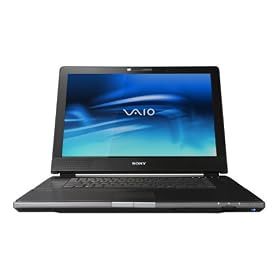
Sony VAIO VGN-AR550E 17-inch Laptop


Sony VAIO VGN-AR550E 17-inch Laptop (Intel Core 2 Duo Processor T7100, 2 GB RAM, 240 GB Hard Drive, Vista Premium)

The luxuriously designed Sony VAIO VGN-AR550E Digital Studio notebook PC provides a power multimedia computer platform for enhanced entertainment performance. But it can also be admired for its gorgeously appointed design, featuring a black exterior, sleek profile, and interfaces and ports that are easily accessible yet discreetly integrated. It features a 17-inch WUXGA widescreen XBRITE-HiColor LCD screen with a 1440 x 900-pixel resolution, and video is powered by the NVidia GeForce 8400M graphics card, with up to 895 MB of video memory. Whether you’re watching downloaded content in HD or enjoying video captured from your compatible HDV camcorder, this VAIO AR-series notebook lets you output HD content to your compatible big screen HDTV via an HDMI connection (delivering audio and video over a single cable). You can also watch and record your favorite shows using the dual TV tuners–both NTSC and ATSC (digital, high-def).
This notebook is powered by the 1.8 GHz Intel Core 2 Duo T7100 processor from the newest “Santa Rosa” chips, which offer a top-of-the-line 800 MHz front-side bus speed and 4 MB L2 cache. The Core 2 Duo processor provides an optimized, multithreaded architecture for improved gaming and multitasking performance, as well as excellent battery management. It also includes Intel’s 4965 AGN wireless LAN, which will connect to draft 802.11n routers and offers compatibility with 802.11a/b/g networks as well. Other features include 240 GB of hard drive space (from dual 120 GB drives), 2 GB of installed RAM (4 GB maximum capacity), multi-format/dual-layer DVD+/-RW drive (which also burns CDs), both PCMCIA and ExpressCard slots, both Memory Stick and SD memory cart slots, and Bluetooth connectivity.
Microsoft Windows Vista Home Premium includes all of the Windows Media Center capabilities for turning your PC into an all-in-one home entertainment center. In addition to easily playing your DVD movies and managing your digital audio library, you’ll be able to record and watch your favorite TV shows (even HDTV). Vista also integrates new search tools throughout the operating system, includes new parental control features, and offers new tools that can warn you of impending hardware failures.
The Basics

  • Processor: The Intel Core 2 Duo T7100 processor has a 1.8 GHz processor speed, super-fast 800 MHz front-side bus (FSB), and a extra-large 4 MB L2 cache. (An L2, or secondary, cache temporarily stores data; and a larger L2 cache can help speed up your system’s performance. The FSB carries data between the CPU and RAM, and a faster front-side bus will deliver better overall performance.) The Intel Core 2 Duo processor has two computational execution cores in a single processor, providing greater system response when running multi-threaded applications simultaneously with no significant increase in power consumption. It’s optimized for multitasking and is ready to support the Microsoft Windows Vista operating system. It can simultaneously run multiple demanding applications–such as graphics-intensive games or serious number-crunching business productivity applications–while downloading music or running virus-scanning security programs in the background. Some of the advanced Intel innovations of the Core 2 Duo processor include:

    • Smart Memory Access: Improves system performance by hiding memory latency, thus optimizing the use of available computer data bandwidth to provide data to the processor when and where it is needed.
    • Advanced Digital Media Boost: Effectively doubles the execution speed for instructions used widely in multimedia and graphics applications.
    • Dynamic Power Coordination: Coordinates Enhanced Intel SpeedStep Technology and idle power-management state (C-states) transitions independently per core to help save power.
    • Deeper Sleep with Dynamic Cache Sizing: Saves power by flushing cache data to system memory during periods of inactivity to lower CPU voltage.


  • Hard Drive: This system offers a total of 240 GB of hard disk drive space from two 120 GB drives (5400 RPM), creating one of the largest capacities you’ll currently find in a notebook PC (as of June 2007). These Serial ATA (SATA) hard drives also quicken the pace with a higher speed transfer of data–akin to FireWire and USB 2.0.
  • Memory: The 2 GB of installed RAM (2 x 1 GB DDR2, PC5300) is an excellent start, but you’ll want to add more RAM to handle today’s demanding multimedia and productivity suites. It provides two DIMM slots and has a large 4 GB maximum RAM capacity. It also offers a top-of-class 667 MHz speed. To receive the faster data transfer benefits of the dual-channel DDR2 RAM, any RAM additions require memory modules of same capacity and clockspeed.
  • DVD/CD Drive: The double-layer DVD drive is compatible with a wide range of formats, including both DVD+RW and DVD-RW discs, CD-RW discs, and dual-layer (DL) DVD+/-R discs, which can hold up to 8.5 GB of data–great for backing up your MP3 collection or your most important documents. It features the following speeds: 2.4x for DVD+R DL, 2x for DVD-R DL, 8x for both single layer DVD+R/-R, 4x for both single layer DVD+RW/-RW, 5x for DVD-RAM, and 24x/16x for CD-R/RW. It reads DVD-ROM discs at 8x and CD-ROMs at 24x.
  • Keyboard & Mouse: This notebook has a standard 86-key keyboard (2.5mm stroke and 19.05mm pitch) and electro-static two-button touchpad.
Screen, Video & Audio
This notebook offers a 17-inch screen with a widescreen 1440 x 900-pixel resolution. And thanks to Sony’s XBRITE-HiColor panel technology, the flat-panel screen will deliver dazzling colors and sharp images whether displaying a DVD movie, television show, or web content. It delivers deep blacks and bright whites, true-to-life color, and razor-sharp detail. And with a glare filter and anti-reflective coating to minimize reflection, you’ll experience a beautifully clear image.
Video is powered by the NVidia GeForce 8400M graphics card, which provides up to 895 MB of available RAM/video memory for unmatched HD video performance on a notebook PC. With support for Microsoft DirectX 10 Shader Model 4.0 and High Dynamic-Range Lighting (HDR), the 8400M lets you rip through all of today’s most advanced and cutting-edge games and applications. Experience real-time photo editing, or immerse yourself in the most complex, true-to-life gaming environments. The audio card includes Sony Sound Reality technology with DSD (Direct Stream Digital) support.
Networking, Connectivity & Expansion
Be ready for the next platform in wireless connectivity with the integrated quad-mode Intel Wireless 4965AGN Wi-Fi chip. Based on the draft 802.11n Wi-Fi specification, it offers up to five times the performance and twice the wireless range as existing 802.11g wireless. It’s also backward compatible with 802.11b/g networks (commonly found in home routers and Wi-Fi hotspots) as well as 802.11a networks (which has a higher throughput, but more limited range–great for closed office environments).
This notebook also includes a next-generation ExpressCard 54 card slot (as well as a PCMCIA slot), which lets you take advantage of thinner, faster, and lighter expansion cards for even more advanced wireless, networking, storage, and security features. Here’s the full list of connectivity options:
  • 3 USB 2.0 ports for connecting a wide range of peripherals–from digital cameras to MP3 players
  • 1 FireWire (also known as IEEE 1394 or i.Link) port for connecting digital video camcorders and other peripherals
  • 1 HDMI output (for connecting to a compatible HDTV or home theater receiver for uncompressed digital audio and video via a single cable)
  • Video input: 1 S-Video
  • Video output: 1 VGA, 1 S-Video
  • 1 ExpressCard/54 slot
  • 1 PCMCIA (or PC Card) slot (Type I/II, CardBus support)
  • Memory Stick/Memory Stick DUO slot (with MagicGate functionality)
  • Secure Digital memory card slot (compatible with MMC cards)
  • 1 headphone jack, 1 microphone jack
  • 1 S/PDIF digital audio out (for connecting to a home theater receiver for 5.1-channel surround sound)
It also has an integrated 56K modem (V.90) and an RJ-45 LAN network port (for a 10/100 Ethernet connection to networks and DSL/cable modems).
Operating System
Windows Vista Home Premium is the operating system for users with advanced computer needs, and it includes all of the Windows Media Center capabilities for turning your PC into an all-in-one home entertainment center for watching DVD movies and accessing your digital audio library. You can also use Windows Media Center to record and watch your favorite TV shows (even HDTV) and to access new kinds of online entertainment content. Computers that include Windows Vista Home Premium and an auxiliary Windows SideShow display will also allow you to access key data even when your computer is off. It is also easier than ever to share files between other PCs in your household and to manage your laptop computer settings to more securely connect via Wi-Fi.
Every edition of Windows Vista provides the essential tools and technologies to help protect you whether you are browsing the Internet, connecting to a wireless network, or just reading e-mail. All editions of Windows Vista include new tools that can warn you of impending hardware failures long before you have lost any important personal data. And, all Windows Vista editions include parental control features that allow you to manage and monitor your family’s use of games, the Internet, instant messaging, and other activities.
Preloaded Software
Includes Sony Click to DVD (for easy DVD creation), Microsoft Works, Microsoft Office 2007 (60-day trial), Symantec Norton Internet Security 2007 (with 60 days of Live Update), Adobe Photoshop Elements 5.0, Adobe Premiere Elements 3.0, Intervideo WinDVD BD.
Dimensions & Weight
This notebook measures 16.4 x 11.8 x 1.32 inches (WxDxH) and weighs 8.4 pounds.
Power
It’s powered by the VGP-BPS2C rechargeable lithium-ion battery, which has a battery life of between 1.5 and 3.0 hours (depending on usage).
What’s in the Box
This package contains the VGN-AR550E notebook PC, rechargeable lithium-ion battery, AC adapter, remote control, IR receiver, HDMI cable, HDMI-to-DVI adapter, and operating instructions. It is backed by a one-year limited hardware warranty, and Sony offers 1-year of toll-free telephone technical assistance.

Product Features

  • Multimedia studio notebook with 1.8 GHz Intel Core 2 Duo T7100 (”Santa Rosa”) processor and 17-inch LCD
  • Dual 120 GB hard drives (240 GB total), 2 GB installed RAM (4 GB max), dual-layer DVD burner, NTSC/ATSC TV tuners
  • Three USB 2.0, one, FireWire, one HDMI output, S/PDIF audio output, ExpressCard 54 card slot, Memory Stick & SD readers
  • Quad-mode Wi-Fi (802.11a/b/g/n), 10/100 Ethernet, Nvidia GeForce 8400M video card with up to 895 MB of shared memory; Bluetooth
  • Pre-installed with Windows Vista Home Premium (with Media Center capabilities)

Apple MacBook MC207LL/A 13.3-Inch Laptop


Inheriting technology and design features from the MacBook Pro line, the new MacBook has been updated with a durable polycarbonate unibody design featuring a brilliant LED-backlit display, a glass Multi-Touch trackpad and Apple's innovative built-in battery for up to seven hours of battery life. Measuring just 1.08 inches thin and weighing 4.7 pounds, the sleek new MacBook cuts a slim profile on any desk (or in any backpack or briefcase). And it comes with everything you need for email, calendar, contacts, browsing the Internet, and more--all a part of the pre-installed Mac OS X Snow Leopard operating system.

The MacBook's new seamless, more durable unibody enclosure with rounded contours makes it easy to pick up and slide into and out of your bag. And it's made of rugged polycarbonate that withstands the rough and tumble of everyday life--at school, at work, or while traveling. Even the bottom of the new MacBook feels different. Covering its entire surface is a nonslip material that keeps your MacBook right where you put it, whether on a desk, table, or airplane tray.

The LED-backlit 13.3-inch glossy widescreen display provides a spectacular viewing experience, helping to make documents, videos, photos, and games look incredibly sharp and detailed. The LED backlighting delivers stunning colors and instant full-screen brightness the moment you open the lid. And its 1280 x 800 pixel resolution offers an outstanding balance of luminous color and easy readability in a perfectly portable size.

Features:
  • 13.3-inch LED-backlit, glossy widescreen display with a widescreen resolution of 1280 x 800 pixels to give you plenty of room to multitask. And the display is greener than ever: power efficient, free of harmful toxins such as mercury, and made of arsenic-free glass.
  • Fast 2.26 GHz Intel Core 2 Duo processor helps you breeze through everyday tasks such as emailing, web browsing, and working with documents, spreadsheets, and presentations in iWork or Microsoft Office for Mac (both sold separately).
  • 250 GB hard drive (5400 RPM)
  • 2 GB installed RAM (1066 MHz DDR3; supports up to 4 GB)
  • NVIDIA GeForce 9400M graphics processor (with 256 MB of DDR3 SDRAM shared with main memory) for an outstanding everyday graphics experience
  • 8x slot-loading SuperDrive with double-layer DVD support (DVD±R DL/DVD±RW/CD-RW)
  • Built-in iSight camera for video chatting
  • Wi-Fi wireless networking (based on 802.11n specification; 802.11a/b/g compatible)
  • Gigabit Ethernet wired networking (10/100/1000BASE-T)
  • Bluetooth 2.1 + EDR (Enhanced Data Rate) for connecting with peripherals such as keyboards, mice and cell phones
  • Two USB 2.0 ports
  • Mini DisplayPort video output with optional adapters for DVI and VGA output
  • Built-in stereo speakers and omnidirectional microphone
  • Combined optical digital output/headphone output (also includes line-in/microphone jack)
  • Up to 7 hours of continuous use with 60-watt-hour lithium-polymer battery
  • Dimensions: 13 x 9.12 x 1.08 inches (WxDxH)
  • Weight: 4.7 pounds
Details:

Processor(s)
  • Processor Mfr:Intel
  • Processor:Core 2 Duo
  • Processor Speed:2.26 GHz

Cache
  • Cache standard, primary :0KB
  • Cache standard, secondary :3MB

Magnetic/Optical Drives
  • Hard Drive:250 GB
  • Hard Drive interface type:SATA (Serial ATA)

RAM
  • RAM standard :2 GB DDR3 SDRAM
  • RAM maximum: 4 GB

Display
  • Display:13.3 in
  • Display, maximum resolution:1280 x 800
  • RAM details:2GB (two 1GB SO-DIMMs) of 1066MHz DDR3 SDRAM; two SO-DIMM slots support up to 4GB
What's in the box:
  • MacBook
  • MagSafe Power Adapter
  • AC wall plug
  • Power cord
  • Install/restore DVDs
  • Printed and electronic documentation
View more Apple MacBook MC207LL/A 13.3-Inch Laptop

Wii Fit Plus with Balance Board


Wii Fit attracted millions of new players to the world of video games. Now Wii Fit Plus offers a range of new features and enhancements to help players reinvigorate their workouts, along with exercises and balance games designed to keep them fun. Players will find a new dimension to the Wii Fit experience as they easily set their own customised workout routines or choose 20, 30 or 40 minute workouts based on how much time they have available. Users will also be able to choose from specialised workout routines that focus on an individual's personal fitness goals or certain target areas. And with the addition of activities like Skateboarding and Rhythm Kung Fu, players will be using the Wii Balance Board accessory in a variety of new and fun ways.

The Wii Balance Board is an innovative accessory created for the Wii Console. As you step onto the board, it interprets the movement of your feet and brings your motions to life, just like the Wii Remote controller. By sensing your weight and balance, an incredibly accurate control scheme is possible. A pressure sensitive, wireless balance board that sits on the floor for the player to stand on in front of the TV. It senses weight and shift in balance in any direction and allows players to follow movements ensuring they have full control of the on-screen activities.
lern more Wii Fit Plus with Balance Board